Best Earbuds for Calls and Video Meetings
1,397 views
A meeting can fall apart in the first ten seconds.
Not because your slides are wrong. Because your earbuds decide that the café grinder, air conditioner, keyboard, and passing traffic are apparently more interesting than your voice.
The frustrating part is that plenty of earbuds sound fantastic for music yet become surprisingly average once Zoom, Microsoft Teams, or Google Meet grabs the microphone. Good active noise cancellation doesn't automatically mean good outgoing call quality. Those are separate jobs, handled by different microphones, processing systems, and software.
That distinction is where this guide takes a different route from our earlier call-earbud coverage. Instead of simply repeating a list of familiar models, we're looking at the 2026 landscape through a work-first lens: microphone architecture, wideband voice, multipoint behavior, platform-specific features, and the annoying little compatibility issues that only show up five minutes before an important presentation.
The short list: which earbuds make sense?
Pick | Best for | Why it stands out |
|---|---|---|
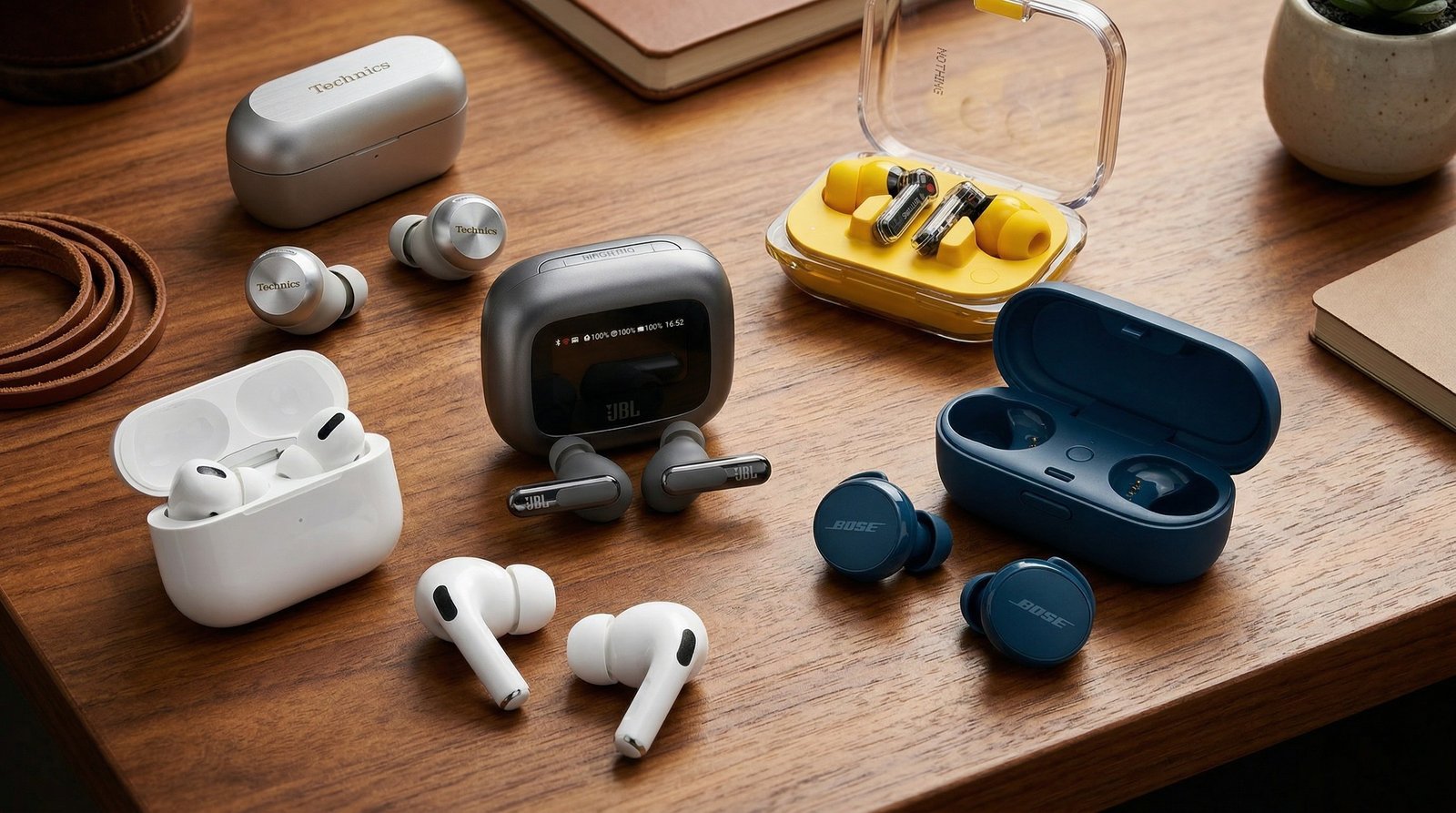
Technics EAH-AZ100 | Multi-device professionals | Voice Focus AI and three-device multipoint |
Apple AirPods Pro 3 | Mac and iPhone users | Voice Isolation and unusually tight ecosystem integration |
Google Pixel Buds Pro 2 | Pixel and Android users | Bluetooth Super Wideband, Clear Calling, Tensor A1 |
Bose QuietComfort Ultra Earbuds (2nd Gen) | Noisy travel and offices | Eight microphones and AI-powered noise suppression |
Sony WF-1000XM5 | Voice quality plus strong ANC | Three microphones per earbud, bone-conduction sensors, AI processing |
Prices move around, so treat them as tiers rather than permanent stickers: expect roughly $200–$230 for upper-midrange models such as the Pixel Buds Pro 2, and around $299 for flagship options such as Bose's QuietComfort Ultra Earbuds (2nd Gen). Sales can scramble that hierarchy quickly.
1. Technics EAH-AZ100: the best fit for people juggling three devices
If your typical day involves a Windows laptop, an iPhone, and an iPad—or some similarly chaotic combination—the Technics EAH-AZ100 deserve serious attention.
Their standout feature isn't merely standard multipoint. Technics supports connections to three devices, with switching designed for combinations such as a PC, smartphone, and tablet. That sounds like a minor specification until you're trying to leave a Teams meeting on your laptop, answer a phone call, then join a Google Meet from a tablet without diving into Bluetooth settings three separate times.
Call processing is equally interesting. Each earbud uses three microphones, while Technics' Voice Focus AI combines an AI noise-reduction chip with proprietary tuning. The company specifically positions the system as improving the experience for both the person speaking and the person listening.
That last part matters.
A lot of "AI call enhancement" marketing focuses exclusively on cleaning your outgoing voice. In a real meeting, hearing the other person clearly is also part of the equation.
Best for: hybrid workers constantly switching devices.
Watch out for: multipoint convenience doesn't guarantee that every operating system or conferencing app will switch at exactly the moment you expect. Before a major presentation, manually test the microphone input in Teams or Zoom. Bluetooth can still have opinions.
2. Apple AirPods Pro 3: the easiest choice inside Apple's ecosystem
For someone using an iPhone and MacBook every day, AirPods Pro 3 are difficult to ignore.
Apple includes Voice Isolation, Active Noise Cancellation, Adaptive Audio, Transparency mode, and Conversation Awareness. More importantly for work calls, Voice Isolation can be selected during supported calls on iPhone, iPad, or Mac to reduce background noise reaching the other participant. Apple's current support documentation specifically lists AirPods Pro 2 and AirPods Pro 3 among the models that support the feature.
The setup friction is pleasantly low. On supported Apple software, you can adjust the microphone mode from Control Center on iPhone or iPad, or through the menu-bar call controls on a Mac.
That's a practical advantage, not just ecosystem branding.
Imagine joining a FaceTime call from a quiet room, then walking outside because a delivery arrives. Instead of accepting wind noise as inevitable, you can switch to Voice Isolation and let Apple's processing prioritize speech.
There is a catch. The magic fades somewhat outside the Apple ecosystem. AirPods still function as Bluetooth earbuds with other hardware, but their deepest integration is tied to Apple devices and current Apple operating systems.
Best for: iPhone + Mac users who want the least complicated setup.
Skip them if: your main work machine is Windows or you regularly split time between Android and multiple non-Apple devices.
3. Google Pixel Buds Pro 2: the technically interesting Android option
The Pixel Buds Pro 2 bring unusually specific voice hardware to the table.
Each bud uses three microphones, a voice accelerometer, wind-blocking mesh, and Google's Tensor A1 processor. Google also lists Bluetooth 5.4 and Bluetooth Super Wideband among the connectivity and voice features.
The software side has conditions, though.
Full access requires a compatible Android setup, and some call features are tied to particular Pixel generations. Google's documentation says Clear Calling requires a Pixel 7 or newer, while Bluetooth Superwideband support is associated with Pixel 8 and newer devices. In other words, don't buy these assuming every feature transfers identically to a random Android phone or Windows laptop.
That sort of limitation is exactly why spec-sheet shopping can go wrong.
On the right Pixel setup, these are compelling work earbuds. On a mixed-device desk, they become a little less special.
Google rates them for up to eight hours of listening with ANC enabled and 30 hours total with the charging case, though meeting use, microphone activity, volume, and other enabled features can change real-world battery life.
Best for: Pixel users who want modern voice features without moving into the $300 flagship tier.
4. Bose QuietComfort Ultra Earbuds (2nd Gen): built for hostile environments
Open-plan offices are noisy. Airports are worse.
Bose's second-generation QuietComfort Ultra Earbuds are the pick here for people whose work calls happen in genuinely difficult acoustic environments. Bose says the earbuds combine eight microphones, dynamic mixing, adaptive filters, and an AI-powered noise-suppression system designed to reduce distractions such as wind and office chatter.
There's also a feature that doesn't get enough attention: self-voice. Bose lets you adjust how naturally you hear yourself through the earbuds. That can help prevent the classic closed-earbud problem where you gradually start speaking louder because your own voice sounds blocked off.
Small feature. Surprisingly useful.
Bose also supports Bluetooth multipoint for two source devices, but there's a real-world wrinkle: Bose notes that this capability arrived through a software update for the Ultra Earbuds. If you're buying older stock, update the earbuds through the Bose app before assuming every advertised feature is active.
Best for: commuters, frequent flyers, noisy offices, and people who spend hours wearing earbuds.
5. Sony WF-1000XM5: strong call technology, with one odd limitation
Sony packed serious communication hardware into the WF-1000XM5.
The earbuds use three microphones per side, an AI-based noise-reduction algorithm involving a Deep Neural Network, and bone-conduction sensors intended to help isolate the wearer's voice from wind and surrounding sound. Sony also rates them for up to eight hours of playback with noise cancellation enabled, with roughly 16 additional hours from the charging case.
That makes them a strong choice for people who need both good call performance and serious noise cancellation.
One edge case deserves attention, though. Sony's support documentation explains that during calls, only one earbud microphone is active under the default configuration, with the right earbud used by default. The left microphone can become active under specific settings. That's the sort of detail you won't see in a cheerful retail bullet list, but it can matter if you regularly wear a single bud.
Best for: frequent travelers and commuters who want strong ANC without ignoring microphone performance.
What actually makes an earbud good for video meetings?
Start with the microphone chain.
A useful call earbud usually combines several elements:
Multiple microphones for beamforming and environmental analysis
Wind detection or physical wind-blocking mesh
Voice sensors or accelerometers that help distinguish speech from external noise
Software-based noise suppression
Stable Bluetooth behavior
Multipoint, if you move between devices
The codec conversation is more complicated than marketing suggests. LDAC, aptX Adaptive, and other high-quality Bluetooth audio codecs can matter for music, but they aren't a simple shortcut to better Zoom calls. Conferencing apps, operating systems, Bluetooth profiles, and microphone handling all influence the final result.
Then there's bandwidth.
Google's Bluetooth Super Wideband implementation is a good example of how call quality can depend on the earbuds, phone, and software ecosystem working together. A feature printed on the box isn't necessarily active in every pairing scenario.
The setup mistakes that quietly wreck call quality
Most people don't test their earbuds until someone says, "You sound far away."
Do this first:
Check the selected microphone. Zoom, Teams, Google Meet, and your operating system can retain an old input device after you reconnect Bluetooth.
Update the earbuds before judging them. Multipoint and call-processing improvements can arrive through firmware, as Bose's own multipoint history demonstrates.
Also, don't assume active noise cancellation affects what other people hear. ANC primarily improves your listening environment. Outgoing voice clarity depends more heavily on the microphone array and voice-processing system.
Different problem. Different technology.
A quick buying framework
Choose the Technics EAH-AZ100 if device switching is part of your daily workflow and three-device multipoint would actually save you time.
Pick AirPods Pro 3 if your work life lives on macOS and iOS. Voice Isolation and Apple's call controls are more valuable there than another abstract microphone specification.
Go for Pixel Buds Pro 2 if you use a recent Pixel and can take advantage of Clear Calling and Super Wideband features.
Choose Bose QuietComfort Ultra Earbuds (2nd Gen) if wind, office chatter, transit noise, and long wear sessions are your biggest enemies.
The Sony WF-1000XM5 remain a strong alternative if you want a sophisticated microphone system alongside excellent noise cancellation, especially for travel.
Independent testing also broadly supports the idea that call performance needs to be judged separately from music performance; RTINGS' 2026 roundup, for example, ranks earbuds partly on microphone noise handling and has continued to reshuffle its recommendations as newer models arrive.
FAQ
Are earbuds good enough for professional Zoom and Teams meetings?
Yes, provided the microphone system is genuinely strong. Premium earbuds can work very well for routine meetings, but a dedicated headset with a boom microphone still has an advantage for mission-critical presentations or extremely noisy environments.
Do I need multipoint Bluetooth?
Only if you regularly switch devices. If your earbuds stay connected to one laptop all day, paying extra for multipoint may add little value. For a phone-plus-laptop workflow, it's a major convenience feature.
Why do my earbuds sound good for music but bad on calls?
Music playback and microphone capture use different hardware paths and Bluetooth behavior. Excellent speakers don't guarantee effective voice isolation, wind reduction, or background-noise suppression.
Which earbuds are best for a MacBook and iPhone?
AirPods Pro 3 are the obvious fit because of Voice Isolation and Apple's integrated switching and call controls on supported devices.
Should I use one earbud or both during meetings?
Both usually provide the best listening experience, but one-bud use can be convenient for long calls. Check the manufacturer's microphone behavior first—Sony, for example, documents specific microphone behavior depending on which WF-1000XM5 earbud is being used and how it is configured.
The best move now is simple: buy for your actual meeting setup, not the feature list with the most buzzwords. Before your next important call, update the firmware, check the conferencing app's microphone selection, and record a 30-second test in a noisy room. That tiny rehearsal will tell you more than another hour of staring at specifications.
best earbuds for calls
work earbuds
microphone earbuds
video meeting headphones
AI call audio
Found this helpful? Share it!